Visual Scheduler
Drag-and-drop scheduling with real-time updates. Colour-coded timeline shows live feeds, blocks, contracts, and on-air content at a glance. Multiple views: 5-minute, hourly, daily, and weekly.

The complete cloud-native broadcast platform — from ingest and scheduling to playout, graphics, and distribution — unified in a single interface.
A walkthrough of the Evrideo Broadcast platform — from ingest and scheduling to live playout and distribution.
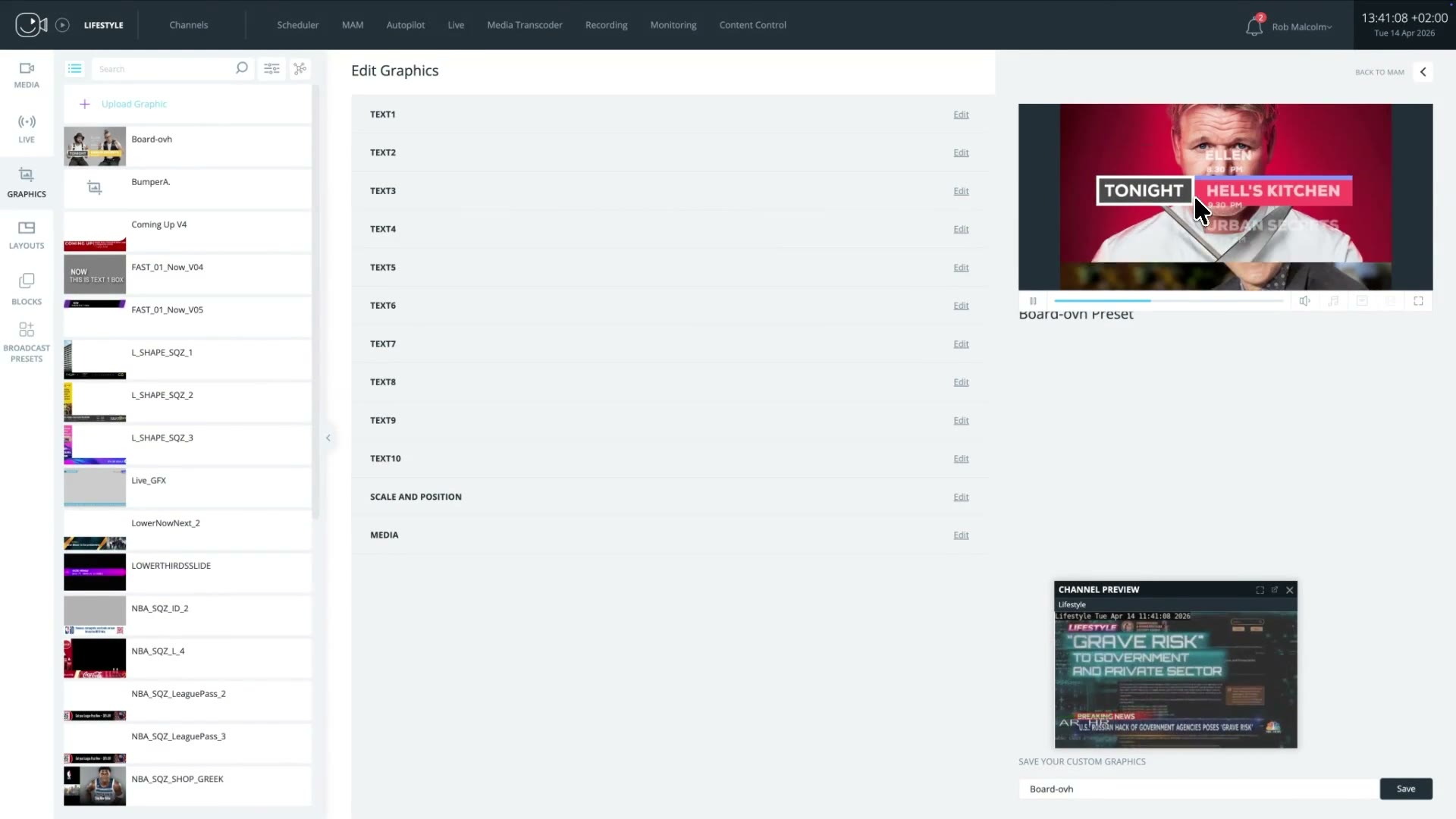
Evrideo Broadcast — platform walkthrough
Nine integrated modules replace your entire broadcast stack.
Drag-and-drop scheduling with real-time updates. Colour-coded timeline shows live feeds, blocks, contracts, and on-air content at a glance. Multiple views: 5-minute, hourly, daily, and weekly.
Centralised Media Asset Management always accessible from the Scheduler, Autopilot, Live, and Transcoder. Upload, search, tag, filter, and organise all video, audio, and graphic assets in one place. Each asset supports unlimited language audio tracks, unlimited subtitle files, and unlimited packshots — no artificial caps on localisation or promotional assets.
Simple PNG/video overlays and advanced HTML5 dynamic graphics. Autopilot rules let you schedule channel logos, promotional slates, and data-driven graphics 24/7 — with tag-based targeting.
Integrate live sources directly into the scheduler. Operate complex live broadcasts with immediate or latency-configured skips, segment breaks, and a dedicated Live tab for frame-accurate control.
Create VOD (MXF), Low-Res preview, and YouTube (MP4) versions of any asset. Burn-in subtitles, trim to specific segments, and auto-deliver to your S3 bucket on completion.
Compose multiple media sources — live feeds, videos, images, and graphics — into a single broadcast frame. Configure size, position, timing, volume, and crop per zone with pixel-level precision.
Import full-day schedules via CSV with configurable rules for missing media, overlap thresholds, and gap handling. Detailed logs surface errors, warnings, and GFX issues before anything goes to air.
Generate customisable As-Run reports with start time, end time, duration, media ID, and metadata fields. Export EPG files for distribution to external platforms and programme guides.
Divide long-form content into named segments with precise TC-IN / TC-OUT points. Evrideo supports automatic segmentation of assets for ad-insertion purposes, and will honour any pre-existing segmentation metadata provided with the asset. Build reusable content blocks — drag once, schedule everywhere — to streamline repetitive programming.
A streamlined operational workflow that keeps your team focused on programming — not infrastructure.
Upload media manually or via S3 batch import. The cloud MAM transcodes, stores, and indexes every asset — searchable by title, ID, tag, language, or date.
Drag assets, live feeds, blocks, and layouts into the visual scheduler. Upload a full-day CSV playlist in seconds. Set Autopilot rules to automate graphics without touching the schedule.
Preview upcoming content with the future-preview tool. Check bell alerts for gaps, missing subtitles, and audio issues. Run a CSV dry-run to catch errors before uploading.
Go live with confidence. The scheduler shows exactly what is on air, what is next, and how long remains. Skip to live feeds instantly or with a pre-configured latency delay.
Export As-Run logs for compliance and ad verification. Generate EPG files for external platforms. Download transcoded deliverables directly from the job history.
Whether you operate a single linear channel or a portfolio of FAST streams, Broadcast scales to your workflow.
Run 24/7 linear channels with frame-accurate scheduling, automated graphics, and live break insertion — all from a single cloud interface.
Launch and operate Free Ad-Supported Streaming TV channels at scale. CSV playlist automation and EPG export keep distribution platforms in sync.
Integrate live feeds alongside pre-produced content. Use the Live tab for latency-controlled transitions and segment-level break management during complex live events.
Manage dozens of channels from a single Channels dashboard. Per-channel alert settings catch gaps, missing subtitles, and audio issues before they reach viewers. Automatic ad-break segmentation and SCTE-35 cue insertion are handled per channel.
Transcode broadcast masters to VOD, YouTube, and low-res preview formats. Burn subtitles, trim segments, and auto-deliver to S3 — ready for any streaming platform. Assets support unlimited language audio tracks, unlimited subtitle files, and unlimited packshots per asset.
Attach unlimited language audio tracks and unlimited subtitle files per asset — no caps on localisation. Attach unlimited packshots per asset for promotional use. Dynamic graphics pull metadata to display localised on-screen information automatically.
Broadcast is format-agnostic and integrates with the tools and platforms your team already uses — including any third-party MAM via our open REST API.
Everything you need to know. Can't find the answer you're looking for? Contact our team.
Evrideo Broadcast is a cloud-native playout and master control platform for linear, FAST, and OTT channels. It provides frame-accurate scheduling, live graphics insertion, and a 99.99% uptime SLA.
Yes. Evrideo Broadcast is purpose-built for FAST (Free Ad-Supported Streaming TV) channels as well as traditional linear broadcast, supporting both simultaneously from a single platform.
Evrideo Broadcast supports HTML5 graphics, CasparCG templates, and third-party graphics systems via standard protocols, enabling live lower-thirds, bugs, and full-frame graphics.
Yes. Evrideo offers fully managed broadcast operations with 24/7 master control operators who act as an extension of your team, handling playout, monitoring, and incident response.
Evrideo Broadcast uses true SaaS pricing — predictable monthly OpEx with no CapEx hardware investment. Pricing scales with the number of channels and features required.
See the Broadcast platform in action. Our team will walk you through a live demo tailored to your channel portfolio and workflow.
Tell us about your business and which tier interests you. Our team will be in touch within two business days.
Contact us